



Welcome back, and thanks for joining us for another edition of the Weekly Tech Report.
This is where we dive into everything new and interesting in the world of technology, from the devices making waves globally to the practical tips and insights that matter most to us here in Zimbabwe.
Every week, we bring you the latest gadget releases, essential software updates, solutions to common tech headaches, and a look back at the innovations that shaped our digital lives. So, grab your device, and let’s explore what’s new this week.
NEW DEVICES: The Week’s Latest Gadgets
This week brought a mix of fresh arrivals across smartphones and laptops, with Xiaomi, Samsung, Realme, and HP each introducing something new for very different kinds of users.
Xiaomi 17 Pro Max

Xiaomi’s new flagship, the 17 Pro Max, is built for those chasing raw performance. It runs on Qualcomm’s Snapdragon 8 Gen 5 processor, paired with up to 16GB of RAM and a massive 1TB of storage. The 6.9-inch AMOLED display pushes a 120Hz refresh rate and can hit over 3500 nits peak brightness, making it one of the brightest panels on any smartphone today. Photography is another highlight, with all sensors at 50MP, from the main sensor to the periscope telephoto lens and even the selfie.
However, Xiaomi lost a lot of cool points by shamelessly copying Apple. The design is clearly trying to mimic the iPhone 17 Pro Max. You could argue that Apple also borrowed the design, but the fact that Xiaomi also skipped the Xiaomi 16 to match the iPhone 17 is damning. I would be embarrassed to say I’m using the 17 Pro Max if I had the Xiaomi. The phone looks solid, with its rear display, which might be a gimmick but may also have utility, but the name and design will put some people off. It’s competitively priced at about $845, though, so that might ease the pain.
Xiaomi 17

For those who want flagship performance without going all-out, the regular Xiaomi 17 trims down some features but keeps the essentials. It carries the same Snapdragon 8 Gen 5 chip but pairs it with options going up to 16GB of RAM and 512GB of storage. The display is slightly smaller at 6.3 inches, still an AMOLED with smooth refresh rates, and while the camera system isn’t as stacked as the Pro Max, it still offers solid all-around photography with all lenses being 50MP too, but slightly inferior. Not bad for the $635 price tag.
Samsung Galaxy M07

Samsung’s latest M-series entry, the Galaxy M07, is designed for value seekers. It comes with a 6.7-inch LCD display (90Hz), a MediaTek Helio G99 processor, and 64GB of internal storage and 4GB RAM. The large 5000mAh battery means it can comfortably handle more than a day on a single charge, while Samsung’s One UI ensures the experience remains familiar. It’s a budget device aimed at students and first-time smartphone buyers who want reliability without spending too much.
Realme 15x

Realme is once again pushing the mid-range market with the 15x, which brings together a Mediatek 6300 processor, a 6.81-inch 120Hz AMOLED display, and a humongous 7000mAh battery with 60W fast charging. Storage goes up to 256GB, paired with as much as 8GB of RAM, making it well-suited for gaming and multitasking. Realme is pitching it as a performance-friendly phone for younger users who want flagship-like smoothness without flagship prices.Sounds like a good deal for about $188.
HP 15s (15s-Eq2143au)
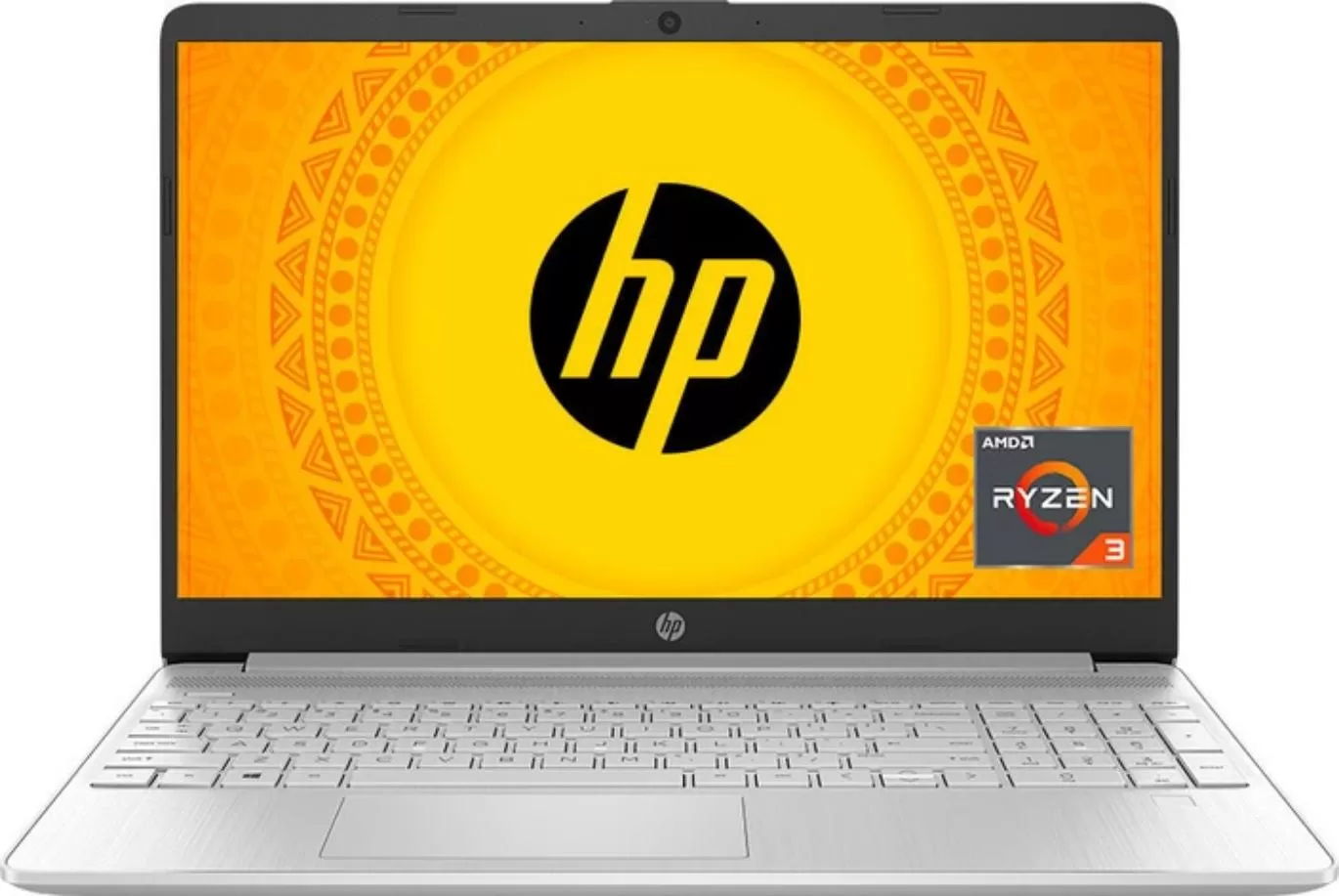
HP’s refreshed 15s laptop continues its role as a dependable everyday machine. Powered by AMD’s Ryzen 3-5300U processor, it comes with 8GB of RAM, expandable to 16 and a 512GB SSD for storage. The 15.6-inch Full HD display offers plenty of space for work or study, and its lightweight design makes it portable enough for students and professionals. With six cores under the hood, it can comfortably handle productivity tasks, streaming, and multitasking. The price is really competitive at $382.
From flashy iPhone-inspired flagships to practical laptops and budget-friendly smartphones, this week’s lineup offers something for every pocket and every need.
SOFTWARE NEWS: AI Gets Smarter, Windows Gets Older
Anthropic Unveils Claude Sonnet 4.5
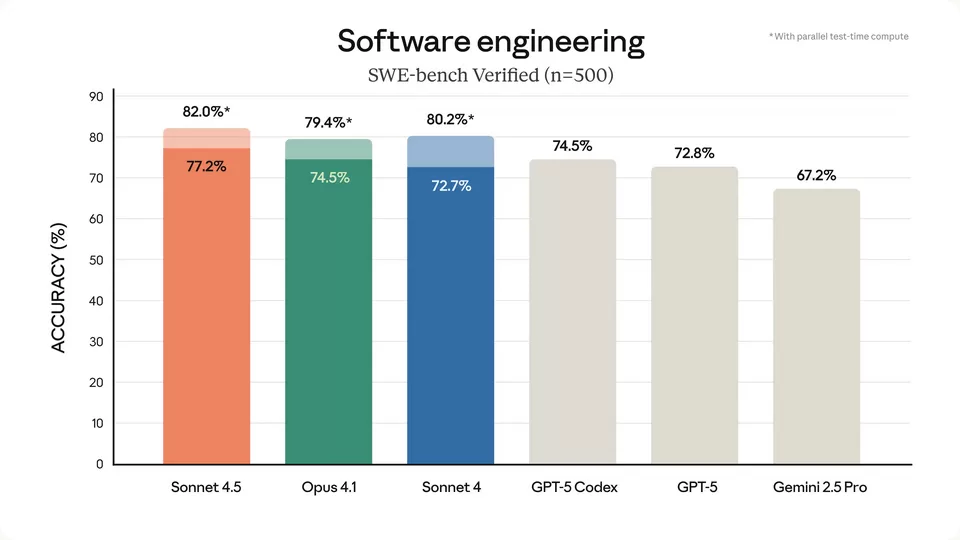
Anthropic has rolled out its newest large language model, Claude Sonnet 4.5, claiming major leaps in how the model handles long, complex tasks, coding, and “agentic” workflows. In internal tests, it managed to run autonomously for more than 30 continuous hours, far longer than prior versions, and was put to work building full web apps without needing human intervention.
Early enterprise users like Canva and Figma say they were impressed by its smoother handling of long documents, better reasoning, and more consistent result quality over time. Under the hood, Anthropic says the model has improved “context management” (i.e. remembering what’s going on across many back-and-forths) and safer behaviours (fewer hallucinations or disallowed content). Claude 4.5 is already being made available through Claude’s own platform, as well as integrated into Amazon Bedrock and Google Cloud environments for developers.
Microsoft Opens Up an Agent Framework
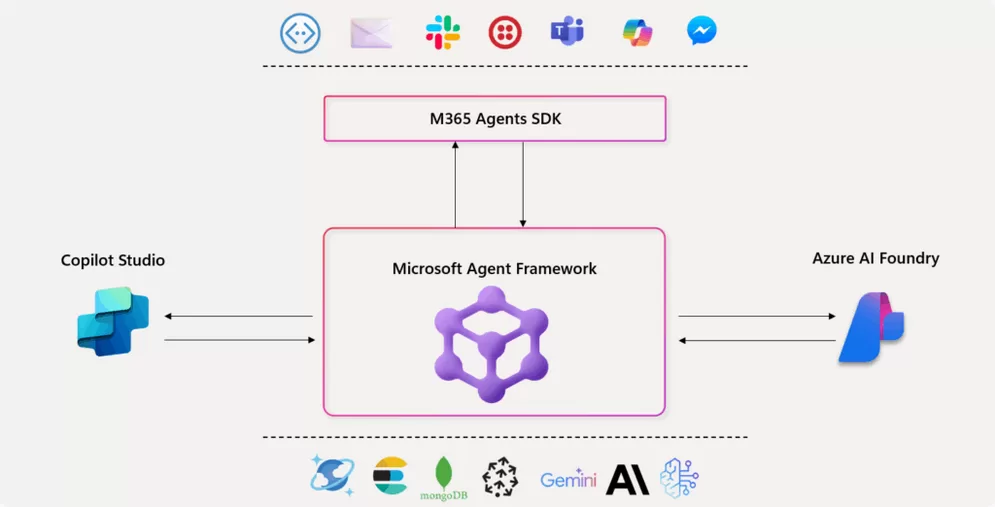
Microsoft launched something new called an agent framework that’s free for anyone to use (open-source). It’s designed to let developers easily get multiple AIs talking and working as a team. Instead of one AI doing everything, you can now build systems where several AIs think together, argue their points, and plan out solutions within your application.
It’s called the Microsoft Agent Framework, and it’s currently in a test phase. Essentially, it’s a shortcut for developers: it takes the existing Microsoft tools and AI processes and wraps them up, so programmers don’t have to write a ton of repetitive, complicated code. Microsoft says it’s great for setting up complex systems, like having one AI hand a task off to another, or having a backup AI ready to step in. Plus, it works seamlessly with other Microsoft products and cloud services (like Azure).
This could let apps use smarter assistants behind the scenes (e.g. one agent for finding data, another for checking, another for summarising). That could be seriously useful.
xAI’s “Macrohard” – AI Software Company, Real This Time

Elon Musk’s AI arm, xAI, is movig ahead with its plans for a new software company called Macrohard. The idea is to create a company that is essentially run by AI. These AI programs would handle most of the work involved in building, testing, and managing software, requiring very little help from humans.
The company is already hiring engineers to build out this infrastructure, so it’s not just a concept. This whole thing will be powered by xAI’s massive supercomputer infrastructure and its Grok AI model, allowing the AI agents to write code, find and fix bugs, keep an eye on things, and manage themselves.
In practice: if successful, we may see AI not just helping programmers but actually doing much of the work for future small-to-medium software projects. Whether it will be stable, trustworthy, or safe at scale remains to be seen.
Fujitsu & DHL Show AI in Sports, Health, and Logistics

At a big tech conference called CEATEC in 2025, Fujitsu and DHL showed off some cool new AI ideas for making people better and improving shipping. Fujitsu demonstrated AI programs that can help athletes improve their performance by tracking things like movement and tiredness, and also AI that can assist with medical tasks, from spotting illnesses to guiding recovery.
DHL showed how they plan to use AI for better shipping, including smarter delivery routes, predicting when packages will arrive, and automating their warehouses. The main takeaway is that AI is moving out of just computers and into the real world; it’s starting to help these guys make transportation smoother and become part of physical systems.
Windows & Office Support Nears the Deadline
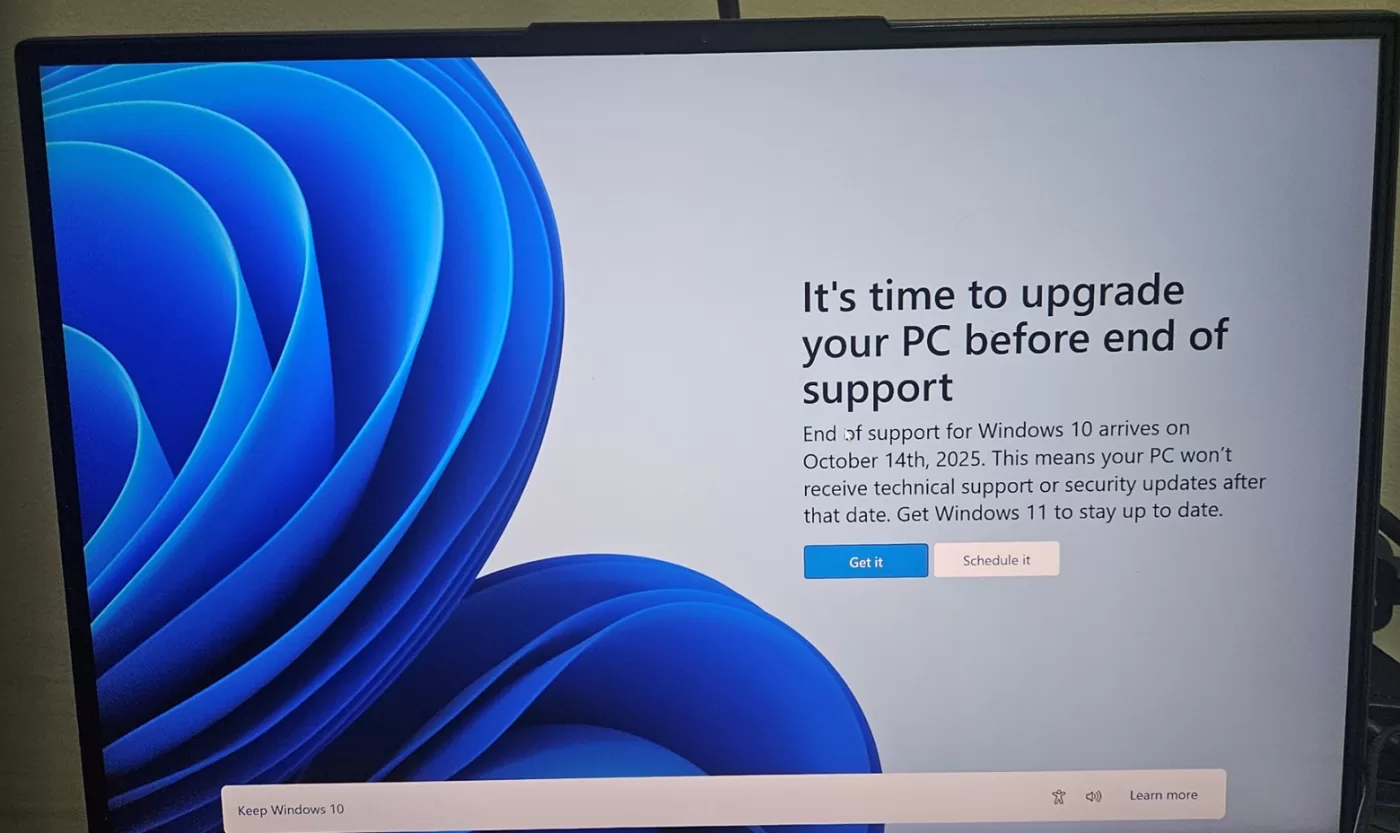
Microsoft has issued a final reminder: Windows 10 support ends on October 14, 2025. After that date, users will no longer receive security updates, feature updates, or technical support. You can keep using the OS, but it will become a security risk over time.
Similarly, non-subscription versions of Office 2016 and Office 2019, which many of us use, will also reach end-of-life on the same day (October 14, 2025). No more patches, bug fixes, or support for them. However, Microsoft will continue providing security updates for Microsoft 365 (the subscription version) running on Windows 10 for another few years until 2028.
If you are still on those older versions, now is truly the time to plan a move, either upgrading OS, migrating documents, or moving to subscription/modern versions. Or not, you do you.
PROBLEM SOLVER: Windows 10’s Last Days, What Now?

What happens if I don’t upgrade from Windows 10?
Windows 10 officially reaches end of support on October 14, 2025. That means no more security patches, bug fixes, or feature updates. The system won’t suddenly stop working; your files will still be there, apps will open, and you can browse the internet. But the longer you stay on an unsupported system, the more vulnerable it becomes to malware, ransomware, and newer hacking methods.
For home users, that’s the real issue: you won’t be protected when new threats appear. Over time, you may also find that certain apps or browsers no longer update, since developers tend to move on when Microsoft does.
What about Extended Security Updates (ESU)?
Microsoft will offer an Extended Security Updates program for Windows 10. This is a paid service that continues delivering critical security patches after October 2025. But here’s the catch: it’s not aimed at ordinary home users. The ESU program is meant for organisations, schools, and businesses that need more time to migrate thousands of PCs.
Pricing details haven’t been shared yet, but going by the Windows 7 ESU program, the cost increases each year and can get expensive. For most individuals, it simply won’t make sense to pay for ESU, if it’s even made available outside of enterprise channels.
So, if you’ve heard of ESU, think of it as a lifeline for big companies rather than a backup plan for your home computer.
But plenty of people still use Windows 7…
It’s true, Windows 7 support ended in 2020, yet millions still run it today. And yes, you can “get away with it” for a while. But the risks keep increasing the longer you go. Cybercriminals know there’s a huge pool of unprotected machines out there, and those systems become easier targets as the years roll on.
In other words, if you choose to keep using Windows 10 past 2025, you’re not alone, but you’re effectively driving without insurance. For some people, that’s a gamble they’re willing to take.
Is my PC ready for Windows 11?
If you do want to upgrade, not every PC can. Windows 11 requires relatively modern hardware, including TPM 2.0, Secure Boot, and newer processors. Microsoft provides a free PC Health Check app that will instantly tell you if your machine qualifies.
- If your PC is compatible – You can upgrade to Windows 11 at no extra cost.
- If it isn’t – Your choices are upgrading parts (sometimes possible, sometimes not worth it), buying a new PC, or switching to an alternative like Linux to keep your machine usable and secure. But if you only know about Linux but not much more, then don’t even dare consider it an option; you’d be better off using even Windows XP.
Bottom line
For regular users, the ESU program won’t be a solution. You can stick with Windows 10, but security risks will grow over time. If your PC can handle Windows 11, upgrading is the safer bet. If it can’t, you’ll have to decide whether to invest in new hardware or run the risk of staying on an unsupported system like many did with Windows 7.
APP OF THE WEEK: Instapaper
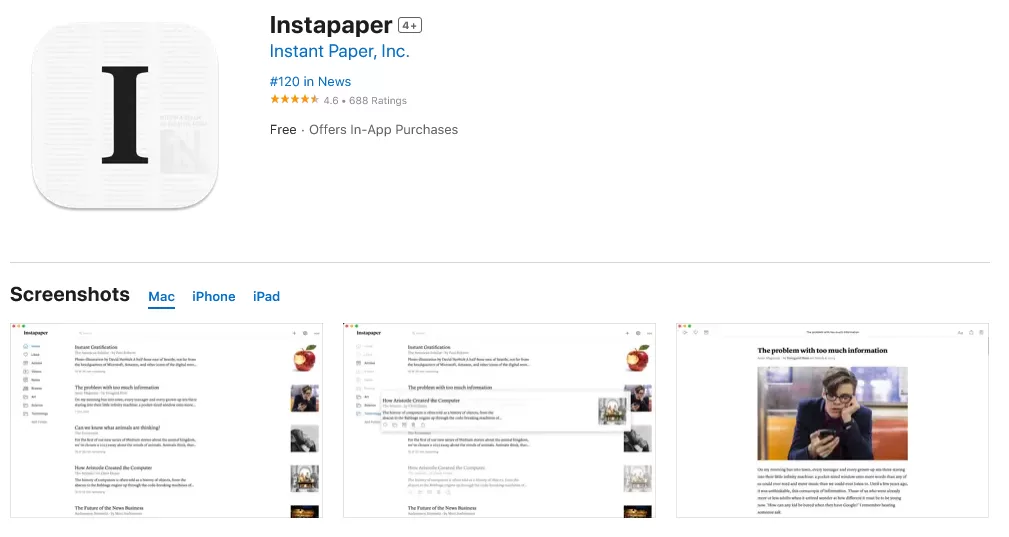
If you’ve ever come across a long article that you didn’t have time to read right away, you’ve probably just left it open in a tab, only for it to get lost among the dozens of others you told yourself you’d come back to. That’s where read-it-later apps come in.
With Pocket now shut down, many people have been left looking for an alternative. One of the oldest and most reliable options still standing is Instapaper.
Simply put, Instapaper lets you save articles, blog posts, and even videos from across the web so you can come back to them when you have the time. But it’s more than just a bookmarking tool; it cleans up cluttered web pages, leaving you with a simple, distraction-free reading experience. You can adjust the font, background, and text size, making it easier to focus on the content.
Another neat feature is offline reading. Once something is saved, you can access it without an internet connection, which is a must in Zimbabwe, where we don’t always have internet access. It also has highlighting and note-taking tools, which are great if you want to remember key points or quotes.
For those moving over from Pocket, Instapaper supports importing your saved articles, so you don’t have to lose the collection you’ve been building up over the years.
Instapaper is available for free on iOS, Android, and the web. There’s also a premium tier with extras like full-text search and unlimited highlights, but the free version is powerful enough for most.
BLAST FROM THE PAST: Remember Mxit?

Before WhatsApp became the default way to chat in Zimbabwe, there was Mxit. If you were a teenager or young adult in the mid-2000s to early 2010s, chances are you spent hours on the app, chatting with friends and even strangers in themed chatrooms.
Mxit stood out because it worked on even the most basic feature phones, using very little data at a time when bundles were expensive and smartphones were rare. You could send messages, play games, and download wallpapers and ringtones, all in one app.
For many in Zimbabwe (and across Africa), Mxit wasn’t just an app; it was an entry point to the internet. It shaped how a generation communicated, flirted, and even did business.
But as smartphones became more common and WhatsApp entered the scene, Mxit’s days were numbered. By the mid-2010s, the app had faded away, leaving only nostalgia in its place.
Do you remember your first Mxit username? Or those late-night chatroom sessions?






Comments
3 responses
Windows 11 can run on many systems that fail Microsoft’s Healthcheck. Rather use Flyby11 system check which is more forgiving. If your system passes that check then use Chris Titus WinUtil to prep your Windows 11 ISO, or burn your Windows 11 ISO using rufus and check the minimal system checks.
Forgot to mention the option of using Flyby11 for the installation as well as the capacity test.
I appreciate the nuance — you covered both pros and cons fairly.